

I stumbled upon something called Nanobrowser. It's a Chrome extension which turns your browser into open source AI web agent.
What's an AI web agent? It makes your web browsing more exciting, with all the gotchas of LLMs combined with the speed and reliability that resembles a drunk grandpa attempting to use a computer without his glasses. No, jokes aside, it is kind of impressive. You just tell it what you want and it attempts to use your browser instead of you. Check this out:
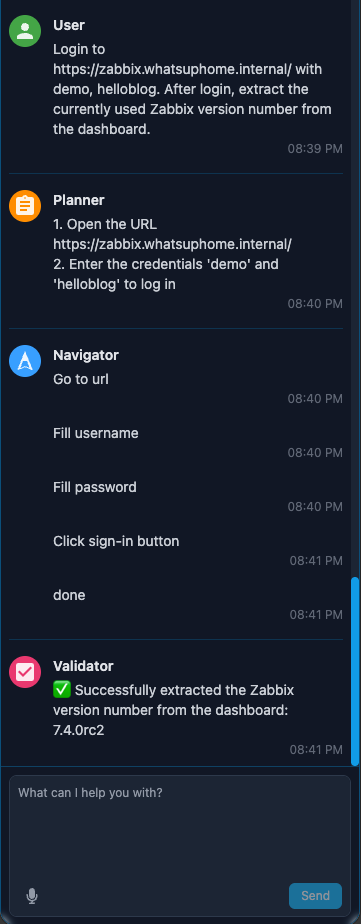
Impressive, huh?
Nanobrowser supports tons of different AIs, including all the commercial ones such as ChatGPT, but allows you to use a local Ollama instance with a local LLM. In other words, private and free. Just look at the number of options you have -- the reason why Ollama is on top of the list like that is because I use it already.

Cool, but how is this related to Zabbix or monitoring?
Current web observability, while detailed and advanced with the likes of Zabbix Browser item type, still requires technical knowledge for multi-step monitoring. It's also prone to break if a website that it is monitoring gets a visual refresh or a backend software change, as if the page elements get changed, you likely have to modify your scripts.
With tools like Nanobrowser, things could radically change. No more need to carefully look for technical page elements lurking deep inside the DOM tree, just use natural language to construct the tests. If during a website major new version navigation flow does change, modifying natural language prompts sure is easier than touching code. The technology is still bit hazardous -- at least with qwen2.5-coder:7b model which was the best I could use locally --, but it's getting there, and oh boy it's getting there fast.
Nice! But, where's the Zabbix part?
We're getting there, though not in a very clean way. If you launch Chrome with
google-chrome --enable-logging=stderr --v=1 2>&1 | tee /tmp/chrome_debug.log &
it will generate a very verbose log. However, when checking what happens with
grep -A5 Agent chrome_debug.log
we will see interesting content, such as
[44774:18092217:0626/225052.320480:INFO:CONSOLE:340] "[PlannerAgent] Planner output {
"observation": "The user's ultimate task is to go to a specific Zabbix URL, log in with provided credentials, and extract the current Zabbix version number from the dashboard. The browser has been started.", "challenges": "",
"done": false,
"next_steps": "1. Open the URL https://zabbix.whatsuphome.internal/ in the current tab.\n2. Log in with the credentials demo and helloblog.", "reasoning": "The first step is to navigate to the target website. Once logged in, the next step will be to extract the Zabbix version number from the dashboard.",
or
[44774:18092217:0626/225205.965390:INFO:CONSOLE:340] "[ValidatorAgent] validator output {
"is_valid": true,
"reason": "Task completed",
"answer": "✅ Successfully extracted the current Zabbix version number from the dashboard, which is 7.4.0rc2."
Now, things are getting much easier from here. For my little test, I don't care so much about the Planner and Navigator part, the Validator should be good enough to see if everything went as planned.
Let's add a new template to Zabbix
I created a new template AI Agent with only one item called AI Agent Response, with the type of Zabbix agent (active). and log[] key.
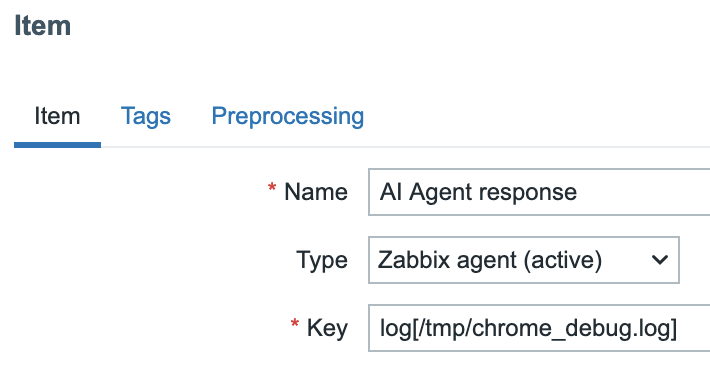
I then added the template to my Mac on Zabbix, and presto! we get results:

But like that, it's just too much. Let's grep only the parts we care about. For that, I used this regular expression on Item preprocessing.
.*\"(is_valid|reason|answer)\": \"([^\"]+)
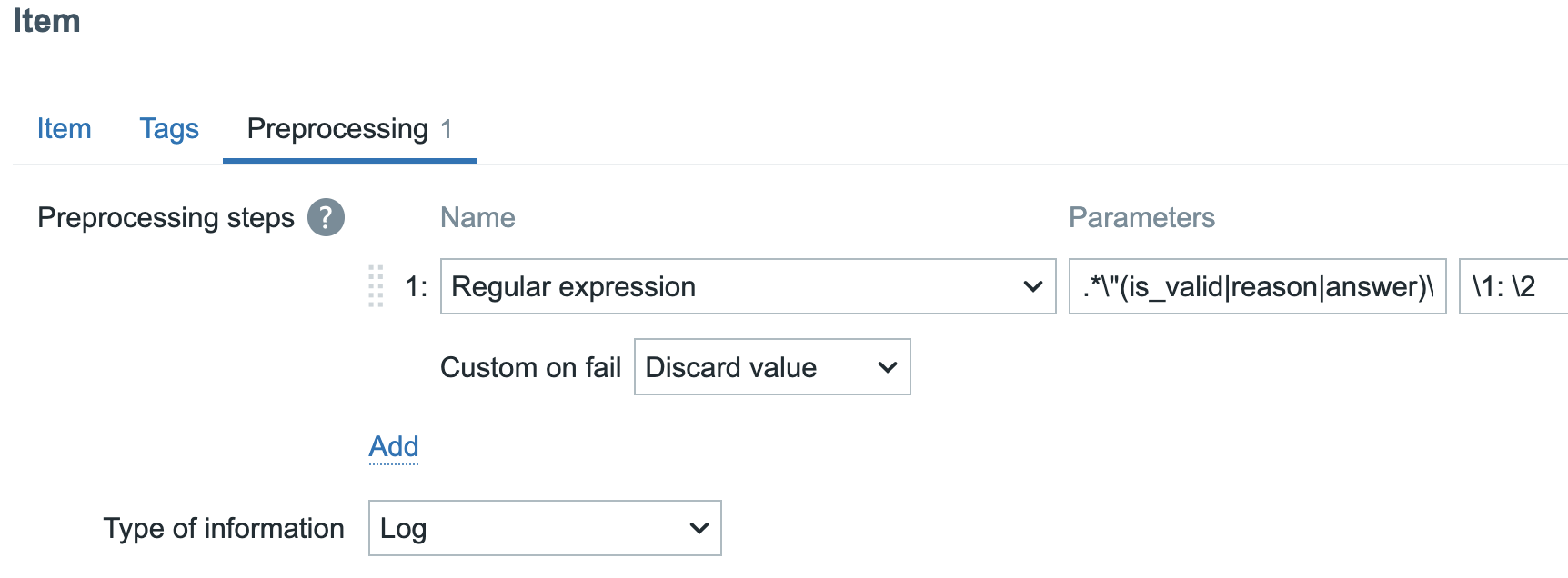
Result
My new log item is now only receiving the interesting parts. This is far from an elegant solution, but for a really quick sledgehammer solution, it works!

From here, the next steps would then be all the standard stuff, such as configuring triggers and dashboards, but that can wait for now. Let's hope that this will be one of those things where I hack something together fast, and someone else adds a proper Zabbix integration. Many moons ago I demonstrated how to take screenshots of websites and show them in Zabbix, and now we have an actual Browser item type. Maybe a future Zabbix could bring us nature language configuration for web tests (and other parts)?
Add new comment